
Download CitizenPortal – Free Government Transparency Tool with AI Search
Overview of CitizenPortal
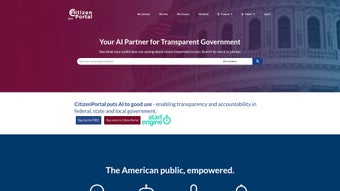
CitizenPortal is a cloud‑based, free web application that aggregates every publicly available transcript, speech, hearing, executive order, and historic document from federal, state, and local U.S. government sources. The platform was launched by the team behind citizenportal.ai with a single mission: to turn opaque bureaucracy into an open, searchable library that anyone can explore without a steep learning curve. By leveraging a modern responsive design, CitizenPortal works on any modern browser—Chrome, Firefox, Safari, Edge, or Opera—so there is no need to download bulky client software or manage separate updates.
The real differentiator is the AI‑driven “CitizenPortal GPT” engine, which allows users to type natural‑language questions such as “What was the voting record of Senator Lee on climate legislation in 2023?” and instantly receive concise, citation‑backed answers. In addition to AI Q&A, the service includes a video‑clip creator that turns any selected paragraph into a short, shareable video, a robust alert system that notifies users when new content matches predefined keywords, and a curated historical repository that houses classic political texts like the Federalist Papers. Whether you are a journalist tracking policy trends, a teacher preparing a civics lesson, a researcher compiling data, or simply a curious voter wanting to see how your representatives vote, CitizenPortal offers a secure, free, and constantly updated gateway to the inner workings of American government.
Key Features, Benefits, and Drawbacks
- Full‑Text Search Across All Government Levels: Search federal, state, and municipal documents using exact phrases, Boolean operators, or simple keywords.
- AI‑Powered Q&A (CitizenPortal GPT): Ask conversational questions and receive answers linked to original source documents.
- Video Clip Creator: Transform any transcript excerpt into a short video with synchronized audio for easy sharing on social platforms.
- Custom Alerts & Notifications: Set keyword‑based alerts that trigger email, push, or SMS notifications whenever new matching content is added.
- Historical Document Library: Access digitized, searchable versions of seminal political works, including the complete Federalist Papers.
- Export Options: Download search results as PDF, CSV, or plain‑text files for offline analysis.
- Responsive Web & PWA Support: Use the service on desktops, tablets, or smartphones; add to home screen for an app‑like experience.
- Secure, Privacy‑First Architecture: All data is encrypted in transit (TLS 1.3) and at rest; no personal data is sold to third parties.
Pros
- All‑in‑one searchable database eliminates the need to jump between dozens of agency portals.
- AI‑driven answers dramatically reduce research time while still providing source citations.
- Video generation creates ready‑to‑post content without external editing tools.
- Custom alerts keep users informed about newly released documents that matter to them.
- Free tier offers generous access; premium tier adds bulk export, higher AI limits, and priority support.
- End‑to‑end encryption and GDPR‑style privacy controls protect user data.
Cons
- AI answers occasionally lack depth for highly specialized niche queries.
- Video rendering can be slower on low‑end devices or weak network connections.
- Historical archive, while extensive, does not yet cover every state’s legacy documents.
- Premium features (bulk download, API access) require a paid subscription.
Rating: 4.5/5
CitizenPortal blends transparency, AI assistance, and multimedia tools into a single, free platform that feels both powerful and approachable. The free version already outperforms many legacy government portals, and the optional premium tier adds valuable workflow enhancements for power users.
Getting Started, Daily Use, and Device Compatibility
Installation & First‑Time Setup
Because CitizenPortal is a web‑based service, there is no traditional installation. To begin, visit citizenportal.ai, click “Sign Up,” and register using an email address or single‑sign‑on via Google or Microsoft. The registration process takes less than two minutes and includes optional two‑factor authentication for users who wish to receive SMS alerts.
After confirming the account, the dashboard appears with a prominent search bar, quick‑access tiles for AI chat, video creation, and alerts, plus a sidebar that leads to the historical library. New users are automatically guided through a brief onboarding tour that explains how to construct effective search queries, set up alerts, and generate videos. For power users, a lightweight Chrome/Edge extension can be installed to add a “Search Government Docs” button directly to any webpage, allowing you to highlight text and instantly query CitizenPortal without leaving the current site.
Device Compatibility and Browser Support
CitizenPortal runs on any modern browser that supports HTML5, CSS3, and JavaScript—this includes Chrome, Firefox, Safari, Edge, and Opera on Windows, macOS, and Linux. The responsive design scales fluidly from large desktop monitors down to 5‑inch smartphone screens. In addition to the web version, a Progressive Web App (PWA) is available for Android and iOS devices.
By selecting “Add to Home Screen,” users can launch CitizenPortal as if it were a native app, complete with offline caching for previously viewed transcripts. The PWA respects the same TLS 1.3 encryption standards as the desktop site, ensuring that all data remains secure regardless of the device. Because the service is entirely cloud‑hosted, there are no OS‑specific binaries to download, eliminating the compatibility headaches that often plague traditional desktop software.
Typical Daily Workflow
Once logged in, most users start with a simple keyword search—e.g., “climate bill 2024”—and receive a list of relevant documents sorted by relevance and date. Clicking a result opens a clean reading view with highlighted search terms and a “Cite” button that copies a properly formatted citation to the clipboard. If deeper insight is needed, the AI chat can be invoked by typing a question such as “Summarize the main arguments of the hearing on renewable energy subsidies.” The AI responds with a concise summary and links to the exact paragraph(s) used.
For sharing, the video clip creator lets you select up to 30 seconds of transcript, add optional captions, and export a lightweight MP4 that can be posted directly to Twitter, LinkedIn, or embedded in a blog post. Alerts are managed from a dedicated panel where you can add, edit, or delete keyword subscriptions; each alert can be delivered via email, push notification, or SMS based on personal preference. This workflow—search, AI clarification, video creation, and alert management—covers the majority of use cases for journalists, educators, researchers, and engaged citizens.
Frequently Asked Questions & Final Thoughts
-
Is CitizenPortal truly free, or are there hidden costs?
The core platform—including full‑text search, AI Q&A, video creation, and basic alerts—is completely free. A paid “Premium” tier is optional and provides bulk export, higher AI usage limits, priority support, and API access for enterprise users.
-
Can I use CitizenPortal offline?
The Progressive Web App caches any documents you have previously opened, allowing you to read them without an internet connection. New searches, AI queries, and video rendering still require an active connection.
-
How accurate are the AI‑generated answers?
The AI model is trained exclusively on verified government transcripts and includes a built‑in citation engine. Every answer includes a link to the original source, so you can verify context instantly. While accuracy is high for most queries, extremely niche topics may occasionally produce less detailed responses.
-
What types of alerts can I set up?
You can create keyword‑based alerts for new speeches, hearing transcripts, executive orders, or any document that contains your specified terms. Alerts are delivered via email, push notification, or SMS, depending on your preference.
-
Is my personal data safe on CitizenPortal?
All user data—including search history, alert settings, and account credentials—is encrypted both in transit (TLS 1.3) and at rest. The platform follows industry‑standard privacy practices and does not sell or share personal information with third parties.
Conclusion & Call to Action
CitizenPortal delivers a rare combination of depth, ease of use, and modern AI assistance—all without charging a dime for the core experience. By consolidating thousands of government documents into a single searchable hub, adding AI‑driven summarization, and providing tools for quick video creation and real‑time alerts, the platform turns raw data into actionable insight for journalists, educators, researchers, and any citizen who wants to stay informed. The optional premium tier adds powerful workflow enhancements for power users, but even the free tier offers more value than many paid research services on the market. Ready to make government information truly accessible? Visit CitizenPortal today, create your free account, and start exploring the full transparency of American governance.



.png)



